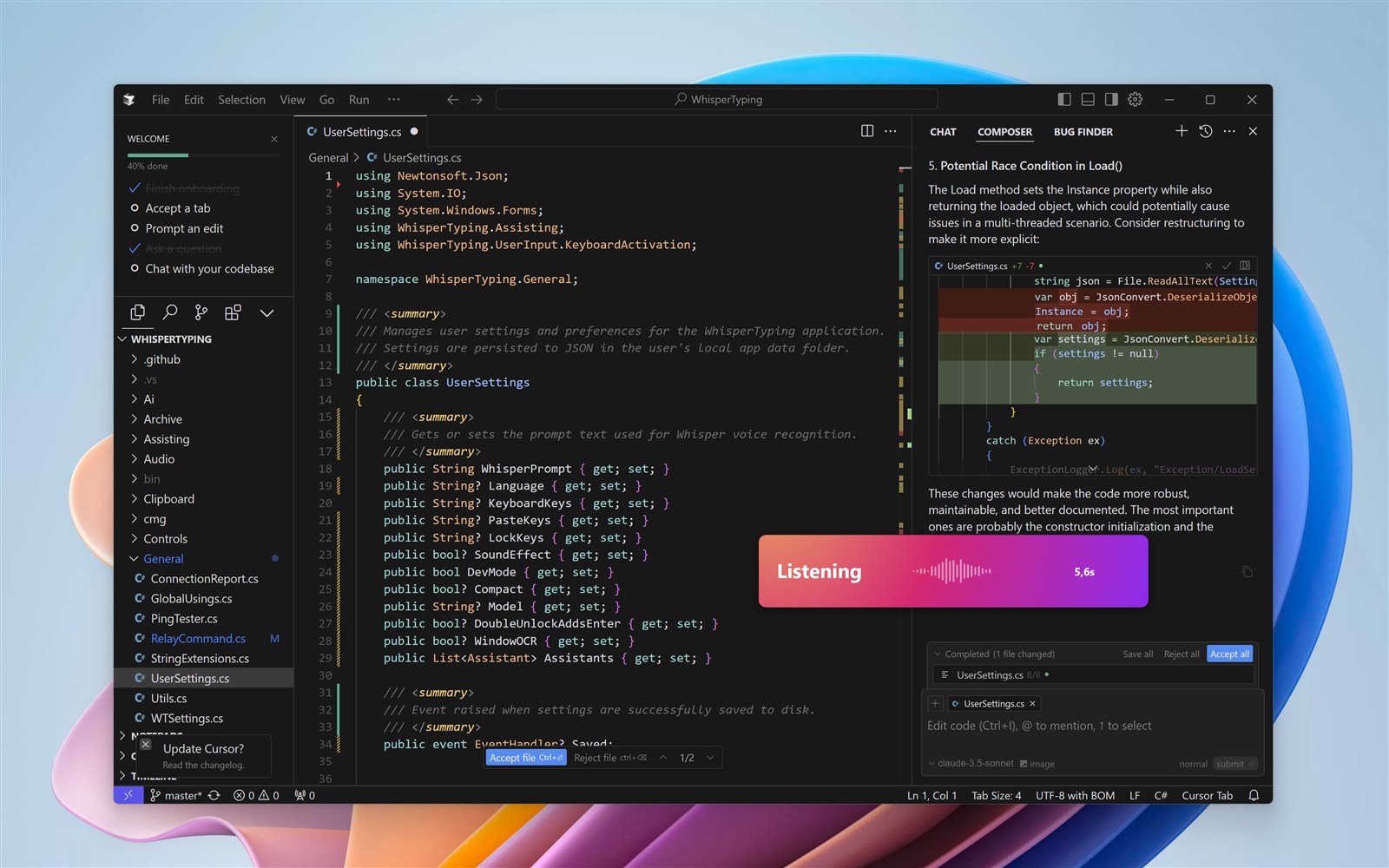
Cursor is the AI-first code editor that's changing how developers write software. Its Agent mode and inline editing are powerful, but typing prompts all day slows you down. With WhisperTyping, you speak to Cursor's AI naturally, 4x faster than typing. This is vibe coding at its best.
What is Cursor?
Cursor is a VS Code fork built around AI. Its default Agent mode can explore your codebase, edit multiple files, and run terminal commands autonomously. You describe what you want in the chat panel, and Cursor builds it. It's become one of the most popular AI coding tools for good reason.
Always Ready When You Are
Here's what makes WhisperTyping essential: your hotkey is always available, no matter what you're doing. Reviewing code, testing your app, browsing documentation - hit your hotkey and start speaking. Your next prompt is ready before you even open Cursor's chat.
Notice something while testing? Hit the hotkey: "The form validation isn't checking for empty strings." By the time you're back in Cursor, your thought is captured and ready to paste.
Voice for Agent Mode
Cursor's Agent mode is where you'll spend most of your time. Instead of typing your instructions, speak them:
- "Refactor this function to use async await"
- "Add error handling for the API call"
- "Write a unit test for this component"
- "Explain what this regex does"
WhisperTyping types your spoken prompt directly into the Cursor chat panel. You can also use it with Ctrl+K for quick inline edits.
Double-Tap to Send
The feature developers love most: double-tap your hotkey to automatically press Enter. Dictate your prompt and send it to Cursor in one motion.
Single tap starts recording. Double-tap stops, transcribes, and sends. Perfect for rapid iteration with Cursor's AI.
Combine this with mouse activation and you can control everything with one hand. Use your middle mouse button or map a side button on mice like the Logitech MX Master to trigger WhisperTyping. Click to start recording, speak your prompt, double-click to send. Your other hand stays free for coffee.
Blazing Fast Transcription
Users love WhisperTyping for its snappiness. On a decent internet connection, the median transcription time is just 370 milliseconds. You stop speaking and your text appears almost instantly.
That responsiveness matters when you're iterating quickly in Cursor. There's no awkward pause between finishing your thought and seeing it on screen. It feels like the tool is keeping up with you, not the other way around.
Custom Vocabulary
Common frameworks and libraries are recognized out of the box. Add words that are unique to your world:
- Your project name and internal codenames
- Names of colleagues and collaborators
- Company-specific terms, acronyms, and jargon
- Niche libraries or tools that speech recognition might not know
Screen-Aware Transcription
WhisperTyping reads your screen using OCR. When you're looking at code in Cursor, it sees the same function names, error messages, and variables you do - and uses them to transcribe accurately.
Why Voice for Cursor?
Cursor is designed for conversational coding. Voice makes that conversation natural:
- Describe changes while looking at the code: "Change this to use the new API format"
- Iterate quickly: speak refinements without breaking focus
- Reduce RSI: give your hands a break during long coding sessions
Tip: Tell Cursor You Use Voice
Add a note to your project's rules that your input comes via voice transcription. In Cursor, create a file in .cursor/rules/ (e.g., .cursor/rules/voice-input.md) with something like:
"User input comes via voice dictation. Expect possible transcription errors like homophones, missing punctuation, or misheard words. Interpret intent rather than taking input literally."
Once Cursor's AI knows to expect voice input, you can stop worrying about transcription accuracy. Just speak naturally, be descriptive, and double-tap to send. No need to review your transcription before sending.
Frequently Asked Questions
Can I use speech recognition with Cursor?
Yes. WhisperTyping adds speech recognition to Cursor on Windows. It works with Cursor's Agent mode chat panel, inline editing (Ctrl+K), and any other text input. Your speech is transcribed in about 370 milliseconds and typed wherever your cursor is.
Does Cursor have built-in voice?
Cursor has an experimental voice mode, but it's limited to giving AI commands within Cursor itself. It's not general-purpose dictation. WhisperTyping complements it by providing voice typing that works everywhere: in Cursor's chat, in your code editor, and in any other application on your computer.
How do I dictate to Cursor on Windows?
Install WhisperTyping and set a hotkey or enable mouse activation. Click into Cursor's chat panel, press your hotkey, and speak your prompt. WhisperTyping types it directly into the chat. Double-tap to transcribe and send in one motion.
What's the best dictation software for Cursor?
WhisperTyping is built for this exact workflow. Its screen-aware OCR reads the code visible in your Cursor editor, so function names and variables are transcribed correctly. Custom vocabulary handles your project-specific terms. And with mouse activation plus double-tap to send, you can dictate prompts to Cursor with one hand on the mouse.